GIMP
Open source raster graphics editor

The GNU Image Manipulation Program or GIMP (/ɡɪmp/ ⓘ, GHIMP) is a free and open-source raster graphics editor. GIMP is always stylized in capitals and was formerly stylized as The GIMP.
GIMP is commonly used for photo retouching, image editing, free-hand drawing, and converting between different image file formats. GIMP is not designed for drawing, however, artists and creators still use GIMP for drawing.
GIMP is freely available on Microsoft Windows, Linux and macOS. It is licensed under version 3.0 or later of the GNU General Public License (GPL). The GIMP project is a non-profit supported by a community of volunteers. Users are encouraged to contribute.
GIMP supports plugins and scripting, allowing users to extend its features and automate tasks.
01History
Spencer Kimball and Peter Mattis began developing GIMP in 1995. GIMP began as a semester-long student project in the eXperimental Computing Facility at the University of California, Berkeley. GIMP was named the General Image Manipulation Program. Kimball and Mattis formed the acronym GIMP by adding the letter G to '-IMP', inspired by a reference to "the gimp" in the 1994 film Pulp Fiction.
GIMP released version 0.54 publicly in 1996. This was the first public release of GIMP. The release attracted many users, and a community of contributors grew around it. These contributors produced tutorials, shared artwork, and introduced improved workflows and techniques.
Richard Stallman of the GNU Project visited the University of California Berkeley in 1997, where Richard met with Kimball and Mattis. Kimball and Mattis asked him if they could change the initialism of GIMP, changing the G to 'GNU' from 'General'. Stallman approved the name change, and GIMP became part of the GNU software collection.
The initial release of GIMP worked on Unix-based systems such as Linux, SGI IRIX and HP-UX. GIMP has since been ported to other operating systems, including Microsoft Windows (1997, GIMP 1.1) and macOS.
GTK a GUI toolkit was developed to facilitate the development of GIMP. GTK was initially called GIMP ToolKit. Peter Mattis was attributed with the development of GIMP ToolKit, this was due to having become disenchanted with the Motif toolkit which GIMP originally used. GIMP used Motif up until version 0.60.
GIMP's mascot Wilber
Tuomas Kuosmanen, also known as tigert, created Wilber the official mascot of GIMP. Wilber was created using GIMP on 25 September 1997.
GIMP developers contributed additional accessories for Wilber, including in the Wilber Construction Kit. The kit is available in GIMP's source code at /docs/Wilber_Construction_Kit.xcf.gz.

02Development
GIMP is primarily developed by volunteers. GIMP is as a free and open source software project, associated with both the GNU and GNOME projects. The development of GIMP occurs in a public git source code repository. Developers communicate on public mailing lists and in public IRC chat channels on the GIMPNET network.
Features are developed in public source code repositories. The GIMP team keeps new features in separate branches and later merged them into the main development branch after the team are confident new changes won't damage existing functions. This approach means that features do not always get merged or that features can take months or years before they become available in GIMP.
Previously, GIMP applied for several positions in the Google Summer of Code (GSoC). From 2006 to 2009 there have been nine GSoC projects that have been listed as successful, although not all successful projects have been merged into GIMP immediately. The healing brush and perspective clone tools and Ruby bindings were created as part of the 2006 GSoC and can be used in version 2.8.0 of GIMP, although there were three other projects that were completed and are later available in a stable version of GIMP; those projects being Vector Layers (end 2008 in 2.8 and master), and a JPEG 2000 plug-in (mid 2009 in 2.8 and master). Several of the GSoC projects were completed in 2008, but have been merged into a stable GIMP release later in 2009 to 2014 for Version 2.8.xx and 2.10.x. Some of them needed some more code work for the master tree.
Second public Development 2.9-Version was 2.9.4 with many deep improvements after initial Public Version 2.9.2. Third Public 2.9-Development version is Version 2.9.6. One of the new features is removing the 4 GB size limit of XCF file. Increase of possible threads to 64 is also an important point for modern parallel execution in actual AMD Ryzen and Intel Xeon processors. Version 2.9.8 included many bug fixes and improvements in gradients and clips. Improvements in performance and optimization beyond bug hunting were the development targets for 2.10.0. MacOS Beta is available with Version 2.10.4.
The first release candidate for version 3.0, RC1, was released on 6 November 2024. After several more months of development, version 3.0 was completed and released on 16 March 2025. This represented the completion of seven years of development to complete a major overhaul of many of GIMP's features and dependencies.
GIMP developers meet during the annual Libre Graphics Meeting. Interaction designers from OpenUsability have also contributed to GIMP.

03Distribution
Gimp is available on and distributed for multiple operating systems, including Linux, macOS and Windows. Many Linux desktop distributions include GIMP on a default installation, including Fedora Linux and Debian. GIMP is published on the Microsoft Store for Windows and has been available since 2022.
GIMP is available for download on the project's website gimp.org. GIMP downloads were previously hosted on SourceForge and was transitioned to self-hosting in 2013 after users raised concerns that misleading ads led to unwanted downloads. SourceForge later repossessed GIMP's dormant account and hosted versions of GIMP for Windows that contained ads.
04Features
Tools can be accessed via the toolbox and through menus and can be used to perform image editing operations. Some of the tools included are filters, brushes, transformation tools, selection tools, layers and masking tools. GIMP's developers have asserted that it has, or at least aspire to it having, similar functionality to Photoshop, but has a different user interface.
Color
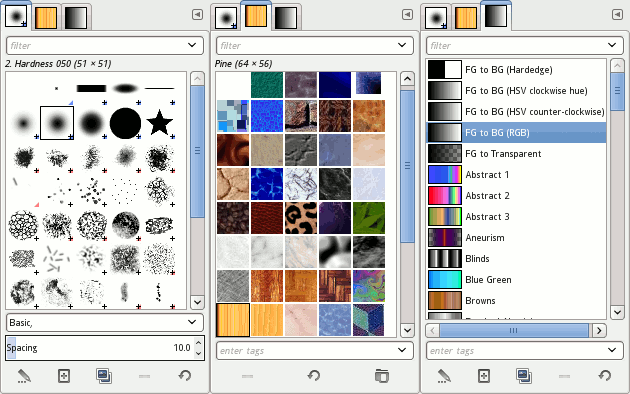
Colors can be selected through several means, including palettes, color choosers and the eyedropper tool which is used to select a color on the canvas. Color choosers include RGB, HSV, LAB, and LCH selector or scales, water-color selector, CMYK selector and a color-wheel selector. Colors can also be selected using hexadecimal color codes, as used in HTML color selection. GIMP supports indexed color and RGB color spaces; other color spaces are supported using decomposition, where each channel of the new color space becomes a black-and-white image. CMYK, LAB and HSV (hue, saturation, value) are supported this way. Color blending can be achieved using the Blend tool, by applying a gradient to the surface of an image and using GIMP's color modes. Gradients are also integrated into tools such as the brush tool, when the user paints this way the output color slowly changes. There are a number of default gradients included with GIMP; a user can also create custom gradients with tools provided. Gradient plug-ins are also available.
Selections and paths
GIMP has selection tools including a rectangular and circular selection tool, free select tool, and fuzzy select tool (also known as magic wand). More advanced selection tools include the select by color tool for selecting contiguous regions of color, and the scissors select tool, which creates selections semi-automatically between areas of highly contrasting colors. GIMP also supports a quick mask mode where a user can use a brush to paint the area of a selection. Visibly this looks like a red colored overlay being added or removed. The foreground select tool is an implementation of Simple interactive object extraction (SIOX), a method used to perform the extraction of foreground elements, such as a person or a tree in focus. The Paths Tool allows a user to create vectors (also known as Bézier curves). Users can use paths to create complex selections, including around natural curves. They can paint (or "stroke") the paths with brushes, patterns, or various line styles. Users can name and save paths for reuse.
Image editing
GIMP has many tools for editing images. Common tools include a paint brush, pencil, airbrush, eraser and ink tools used to create new or blended pixels. The Bucket Fill tool can be used to fill a selection with a color or pattern. The Blend tool can be used to fill a selection with a color gradient. Color transitions can be applied to large regions or using custom paths to affect smaller areas.
GIMP also provides sophisticated tools. These tools perform complex operations. Including:
- A clone tool, which copies pixels using a brush
- A healing brush, which copies pixels from an area and corrects tone and color
- A perspective clone tool, which works like the clone tool but corrects for distance changes
- Blur and sharpen tools
- A Smudge tool that can be used to subtly smear a selection where it stands
- A dodge and burn tool used as a brush that makes target pixels lighter or darker
Layers, layer masks and channels
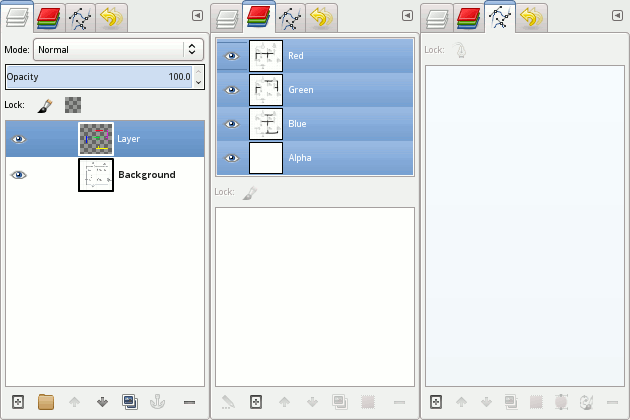
Gimp supports images with one or more layers. The user manual uses an analogy: "A good way to visualize a GIMP image is as a stack of transparencies". Each layer in an image is made up of several channels. In an RGB image, there are 3 color channels red, green, and blue and the alpha channel. Color channels look like slightly different gray images, but when put together they make a complete image. The alpha channel measures opacity or how much of a layer is seen in the final composition. Layer modes can be applied to layers and perform a certain color operation on the layer.
Text layers can be created using the text tool. Text layers allow a user to write on an image. Transformations can be performed on text layers, including changing them to a path or selection.
GIMP has supported link layers since version 3.2. Link layers are layers linked to external image files. Changes made to linked external image will be reflected in the link layer.
Automation, scripts and plug-ins
GIMP has approximately 150 standard effects and filters, including Drop Shadow, Blur, Motion Blur and Noise.
GIMP operations can be automated with scripting languages. The Script-Fu is a Scheme-based language implemented using a TinyScheme interpreter built into GIMP. GIMP can also be scripted in Perl, Python (Python-Fu), or Tcl, using interpreters external to GIMP. New features can be added to GIMP not only by changing program code (GIMP core), but also by creating plug-ins. These are external programs that are executed and controlled by the main GIMP program. MathMap is an example of a plug-in written in C.
GIMP supports several methods of sharpening and blurring images, including the blur and sharpen tool. The unsharp mask tool is used to sharpen an image selectively , it sharpens only those areas of an image that are sufficiently detailed. The Unsharp Mask tool is considered to give more targeted results for photographs than a normal sharpening filter. The Selective Gaussian Blur tool works in a similar way, except it blurs areas of an image with little detail.
GIMP-ML is an extension for machine learning with 15 filters.
GEGL
The Generic Graphics Library (GEGL) was first introduced in GIMP 2.6 to improve how the software processes images. Initially GIMP used GEGL for high bit-depth color operations, helping reduce data loss when adjusting colors.
GIMP 2.8 was limited to 8-bit color, which is much lower than the 12-bit or higher depth that most digital cameras produce. GIMP 2.10 introduced full support for high bit-depth color, and hardware acceleration was enabled through OpenCL for some tasks.
GIMP 3.0 introduces non-destructive filters, allowing users to apply effects without permanently changing the original image. This means they can be edited, toggled on or off, or removed after being applied. Third-party filters are also supported, though they will not be retained if the necessary plugins are missing.
CTX
Gimp uses the CTX library for vector graphics rasterisation. The CTX library was first used in GIMP version 3.0. The CTX library allows GIMP to convert simple shapes into vector objects, such as lines and circles.
File formats
GIMP has a native file format XCF and also supports importing and exporting to and from many file formats. Plugins can be used to extend GIMP to support additional file formats.
GIMP's XCF file format captures all the information GIMP can contain about an image. The name XCF was made by taking one letter from each word in 'Experimental Computing Facility', the location in the University of California, Berkley where the software was authored.
05Forks and derivatives
Variants and derivatives of GIMP can be created by an action known as forking. Forking occurs when the source code of GIMP is modified and released separate to the GIMP project. Forking is permitted by GIMPs license, the GNU General Public License (GPL), so long as the derivative software retains the same license. Variants and derivatives are separate projects and are not hosted or linked on the GIMP site.
Derivatives of GIMP may not be cross-platform, only supporting one operating system rather than many.
Forks
- CinePaint, formerly Film Gimp, is a fork of GIMP version 1.0.4, used for frame-by-frame retouching of feature films. CinePaint supports up to 32-bit IEEE-floating point color depth per channel, as well as color management and HDR. CinePaint is used primarily within the film industry due mainly to its support of high-fidelity image formats. It is available for BSD, Linux, and macOS.
- GIMP classic is a patch against GIMP v2.6.8 source code created to undo changes made to the user interface in GIMP v2.4 through v2.6. A build of GIMP classic for Ubuntu is available. As of March 2011, a new patch could be downloaded that patches against the experimental GIMP v2.7.
- GIMP Portable is a portable version of GIMP for Microsoft Windows XP or later that preserves brushes and presets between computers.
- GIMPshop was a derivative of GIMP that aimed to replicate Adobe Photoshop in some form. Development of GIMPshop was halted in 2006. The lead developer, Scott Moschella, abandoned the project after somebody registered the domain name "gimpshop.com" and claimed to be an official site taking donations, despite having no affiliation with Moschella.
- GimPhoto is a fork that features a Photoshop-esque UI, similar to GIMPshop. Further modifications are possible with the GimPad tool. GimPhoto stands at version 24.1 for Linux and Windows (based on GIMP v2.4.3) and version 26.1 on macOS (based on GIMP v2.6.8). Installers are included for Windows 7, 8.1, and 10; macOS 10.6+; Ubuntu 14 and Fedora; as well as source code. Only one developer is at work in this project, and as a result, fast updates are rare and there are no plans to update it to GIMP 2.8.x or above.
- McGimp was an independent port for macOS that aimed to run GIMP directly on this platform, and integrated multiple plug-ins intended to optimize photos.
- Seashore is a port for macOS, which aims to have a simpler UI based on Cocoa.
- Glimpse is a discontinued fork of GIMP, started due to complaints over the word "gimp" being derogatory towards disabled people.

06Extensions
Plugins can extend GIMP's functionality for specific purposes. Notable plugins include:
- GIMP-ML, which provides machine learning-based image enhancement. GIMP-ML with python 3 is next target in development.
- GIMP Animation Package (GAP), official plugin for creating animations. GAP can save animations in several formats, including GIF and AVI.
- Resynthesizer, which provides content-aware fill. Original part of Paul Harrison's PhD thesis, now maintained by Lloyd Konneker.
- G'MIC, which adds image filters and effects.

Sources and credits
This article is adapted from the Wikipedia article “GIMP”, written by its contributors and licensed under CC BY-SA 4.0. Fathomly has changed the layout, removed citation markers, navigation and maintenance notices, and adjusted punctuation. This adapted version is shared under the same license. For references, see the original article.
Images, from Wikimedia Commons:
- The GIMP icon - v3.0.svg by Aryeom Han, CC BY-SA 4.0
- Wilber (Gimp mascot) horizontal.png by The GIMP Development team, GPL
- The GIMP icon - gnome.svg by Tuomas Kuosmanen, GPL
- Cycle of gradients brushes pratterns in gimp-2.8.gif by Original: Various; see AUTHORS file in source distribution. Photograph: LunaVorax, CC0
- Cycle of layers channels paths in gimp-2.8.gif by Original: Various; see AUTHORS file in source distribution. Derivative work: LunaVorax, CC0
- Droste Daisy.jpg by Alexandre Duret-Lutz from Paris, France, CC BY-SA 2.0
- BurningFlame0.gif by BobHelmut, CC BY-SA 3.0
Fathomly is not affiliated with or endorsed by the Wikimedia Foundation. Spotted a problem? Tell us.
